I love alerts that tell me when a new opportunity is coming. All day long the WiSE Indicator periodically tells me to take a look at the chart when there is an important swing on the horizon.
But the problem is that I sometimes freak out when a buzzing annoying sound suddenly startles me out of my daydream. NinjaTrader provides only a few preinstalled sound files. There's also no easy way to add custom sounds of your choice. I was looking for a way to change the alert sound to something more pleasant — at least something like the existing "OrderFilled." I found a solution: you can change the alert sound to a voiceover with help of Google Translate.
Here's a step-by-step guide:
1. Open Google Translate
Go to translate.google.com
2. Choose English as the source language
3. Type in your phrase
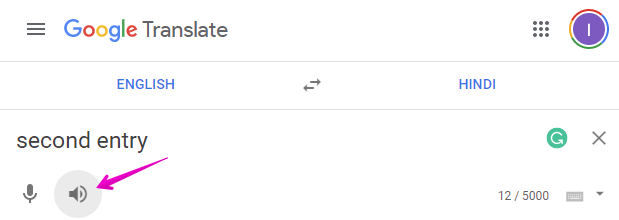
Type the phrase you want as your new alert. Let's say "Second entry".
4. Click on the speaker icon
Play it back to hear how it sounds. You may want to play with "?" or other symbols to change intonation. You can also change the language to Hindi or Russian for a different flavor.
5. Get the audio URL
Your browser's address bar will look something like:
https://translate.google.com/?source=gtx&sl=en&tl=mt&text=Second%20entry&op=translate
6. Download the audio
Open this URL in a new window:
https://translate.google.com/translate_tts?ie=UTF-8&tl=en&client=tw-ob&q=Second%20entry&op=translate
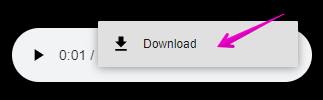
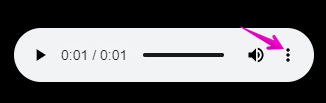
Replace Second%20entry with your phrase, and en with your favorite language code. Click the three dots and then "Download".
7. Convert MP3 to WAV
NinjaTrader requires .wav format. Use a free online converter like online-convert.com to convert your .mp3 to .wav.
8. Place the file
Move the .wav file to your NinjaTrader 8 sounds folder:
C:\Program Files (x86)\NinjaTrader 8\sounds
9. Configure in NinjaTrader
Now you can rename and use this file in your indicator or strategy properties — including the WiSE Indicator alert settings.
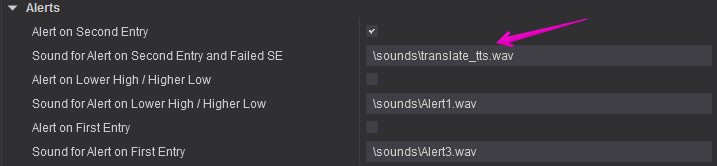
You can use this method to change alert sounds in NinjaTrader 8 to your favorite phrases.
I hope you will find this useful. Good trading!